
Free TradingView indicators: MACD and RSI with divergences
Two indicators of mine for TradingView, each with its own explainer video (in Spanish) and completely free. Both mark the divergences with price on your chart, hidden ones included, so you don’t have to hunt for them by eye.
MACD with divergences
The MACD measures the strength of a move and helps you confirm it. My version is the classic MACD (12- and 26-period averages and a 9-period signal line), with its histogram, and it also marks bullish and bearish divergences on your chart, hidden ones included.
Get the MACD for free ↗Watch the video

What the MACD is
The MACD (Moving Average Convergence Divergence) compares two exponential moving averages of the price: a fast one, of 12 periods, and a slow one, of 26. The MACD line is the difference between the two; the signal line is a 9-period average of that line, and the histogram is the distance between them.
When the MACD line is above the signal line and the histogram is growing, momentum is bullish; when it is below and the histogram is growing downwards, it is bearish. That’s why it is used as a strength indicator: it doesn’t say where the price is going, but how much energy it is moving with.
How to read its divergences
- First look at the trend on a higher timeframe: a bullish divergence carries more weight at a support level than in the middle of a drop.
- When a label appears, check that the two points it joins are clear highs or lows, not a small bounce.
- Wait for the price to confirm: a break of structure, the MACD line crossing the signal line, or the candle close you are looking for.
- Decide where you are wrong before entering: the stop goes beyond the high or the low that marks the divergence.
Before you enter, decide where your stop goes and how much you risk. Both are explained on the blog: where to place your stop loss and how much to risk per trade.
The video: how the MACD works
 8:15
8:15YouTube video · in Spanish
MACD made easy: what it is and how to use this strength indicator in trading
Watch the video on YouTube ↗RSI with divergences
The RSI tells you whether an asset is overbought or oversold and helps you spot price tops and bottoms. My version also marks the divergences between price and RSI for you, both regular and hidden.
Get the RSI for free ↗Watch the video
What the RSI is
The RSI (Relative Strength Index) compares the strength of the candles that close up with that of the candles that close down over a number of periods (the classic setting uses 14) and sums it up as a value from 0 to 100.
- Above 70: overbought zone. The price has risen fast and the rise may slow down.
- Below 30: oversold zone. The price has fallen fast and the drop may slow down.
- Around 50: neither buying nor selling dominates.
The most useful thing about the RSI isn’t the number, but the moment it stops following the price: that is a divergence. And it doesn’t predict tops or bottoms: in a strong trend, it can stay overbought or oversold for a long time.
How to read its divergences
- First look at the trend: in a rise, hidden bullish divergences carry more weight; in a fall, hidden bearish ones.
- A divergence in the overbought or oversold zone makes more sense than one in the middle of the range.
- Wait for the price to confirm with a breakout or a candle close, instead of entering as soon as the label appears.
- Decide where you are wrong before entering: the stop goes beyond the high or the low that marks the divergence.
Before you enter, decide where your stop goes and how much you risk. Both are explained on the blog: where to place your stop loss and how much to risk per trade.
The video: how the RSI works
 14:29
14:29YouTube video · in Spanish
How to use the RSI and spot divergences: boost your technical analysis
Watch the video on YouTube ↗How to add them to TradingView
They are protected scripts: you can use them for free, but their code is hidden, and that’s why they don’t always show up when you search for them. Adding them takes two minutes:
- Open the indicator’s page on TradingView (MACD or RSI) with your account; a free one is fine.
- Scroll down to the “Protected script” section and click “Add to favorites” (the star).
- Go back to your chart, open “Indicators” and go to the “Favorites” tab.
- Click “MACD con Divergencias” or “Indicador de Divergencias (RSI)” and it is added to the chart. From there you can change its colours and settings.
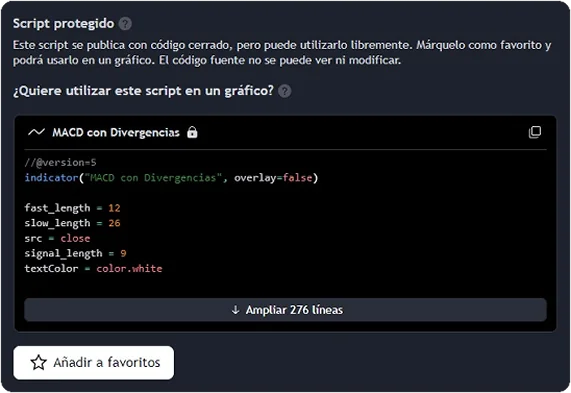
The free version of TradingView limits how many indicators you can have on the same chart at once. If you’re already at the limit, remove one before adding another or it won’t load.
What a divergence is
A divergence is a difference in direction between the price and the indicator: the price makes a new high or a new low and the indicator doesn’t follow. Finding them by hand takes time and it’s easy to see them where there are none, so my two indicators draw them on their own: they join the two highs or the two lows and add a label with the type.
- Bullish: The price makes a lower low, but the indicator doesn’t follow: the drop is losing strength and may be close to turning.
- Bearish: The price makes a higher high, but the indicator doesn’t follow: the rise is losing strength and may be close to turning.
- Hidden bullish: In an uptrend, the price holds a higher low while the indicator falls further: it is usually read as a sign that the rise may continue.
- Hidden bearish: In a downtrend, the price makes a lower high while the indicator rises further: it is usually read as a sign that the drop may continue.
Regular divergences warn that the move is losing strength; hidden ones, that the trend may continue. None of them is a buy or sell order: they are confirmed by price.
To mark a divergence, the high or the low has to have formed already. That’s why, like any divergence indicator, the label appears a few candles after the turn, not on the exact candle.
Frequently asked questions
Are the indicators free?
Yes, both of them. You add them to your chart from TradingView without paying anything, even with a free account.
Why don’t they show up when you search for them on TradingView?
They are protected scripts: the code can’t be seen, but they can be used. The reliable way to add them is to open their page, click “Add to favorites” and look for them in the “Favorites” tab of the indicators, under their names, which are in Spanish: “MACD con Divergencias” and “Indicador de Divergencias (RSI)”.
Can you use both at once?
Yes, on the same chart or on different charts. The free version of TradingView limits how many indicators you can have on the same chart at once. If you’re already at the limit, remove one before adding another or it won’t load.
Which is better for spotting divergences, the RSI or the MACD?
They measure different things: the RSI, the speed of the price within a range from 0 to 100; the MACD, the strength of the momentum. Many traders look at them together, and when both mark the same divergence, the signal carries more weight.
What is a hidden divergence?
It is one that goes with the trend: in a rise, the price makes a higher low while the indicator makes a lower one (hidden bullish); in a fall, the opposite (hidden bearish). It is usually read as a continuation signal.
What settings does the MACD come with?
Those of the classic MACD: a 12-period fast average, a 26-period slow one and a 9-period signal line, calculated on the close. You can change them in the indicator’s settings.
What does it mean when the RSI is overbought?
That it is above 70: the price has risen fast in a short time. It doesn’t mean it is going to fall; in a strong trend it can keep rising with the RSI in that zone.
Do they work on any timeframe and in any market?
They work on any TradingView chart: crypto, stocks or forex, and on any timeframe. On very low timeframes more divergences appear, and many of them lead nowhere.